Quests
Quests are assets with objectives and rewards. A quest log on the player tracks progress by listening to the game: kills, inventory changes, talks and locations.
See it running: the 09 · Quests and Dialogue demo scene. See Demos to import the scenes.
Every field, its default and every member you can call: Quests reference.
Authoring
- Create → Vantage → Quests → Quest Category once per category: Main, Side, Daily. Sort weight and colour are for your UI.
- Create → Vantage → Quests → Objectives → Kill / Collect / Talk / Reach Location. Set the required count and the filter: unit tag for kills, item for collects, the quest giver for talks, a marker id for locations.
- Create → Vantage → Quests → Rewards → Item / Currency / XP.
- Create → Vantage → Quests → Quest Definition. Drag in the category, objectives and rewards.
- Check Use Quest Log on the player’s unit definition.
- Check Use Quest Giver on an NPC’s definition and fill Offered Quests. Right-clicking the NPC walks the player over and starts a conversation on the player’s
VtUnitDialoguewith the quests as accept and turn-in answers; see the dialogue page.OnQuestOfferedalso fires with the full offered list for UI that filters withIsAvailableitself.
For reach-location objectives, place a VtQuestLocationMarker in the scene and give it the id the objective expects.
Lifecycle
flowchart LR
    A[Available] -->|Accept| B[Active]
    B -->|objectives done| C[Complete]
    C -->|TryTurnIn| D[Turned in]
    B -->|time up, protected unit died, Fail| F[Failed]
    F -->|Accept| B
    D -->|Accept, repeatable| B
    B -->|Abandon| A
Available is computed: level, prerequisites, exclusions, requirements and cooldowns are checked against the holder every time you ask.
Chains and branches
| Field | Meaning |
|---|---|
| Required Level | Minimum holder level. |
| Required Completed Quests | All of these must have been turned in. |
| Required Any Of Quests | At least one of these must have been turned in. Combine with the previous field for “A and (B or C)”. |
| Excluded By Quests | Once any of these has been turned in, this quest is never offered. Put the guards’ quest here on the thieves’ quest and vice versa. |
| Requirements | Requirement assets that must all pass. See below. |
Quest Graph
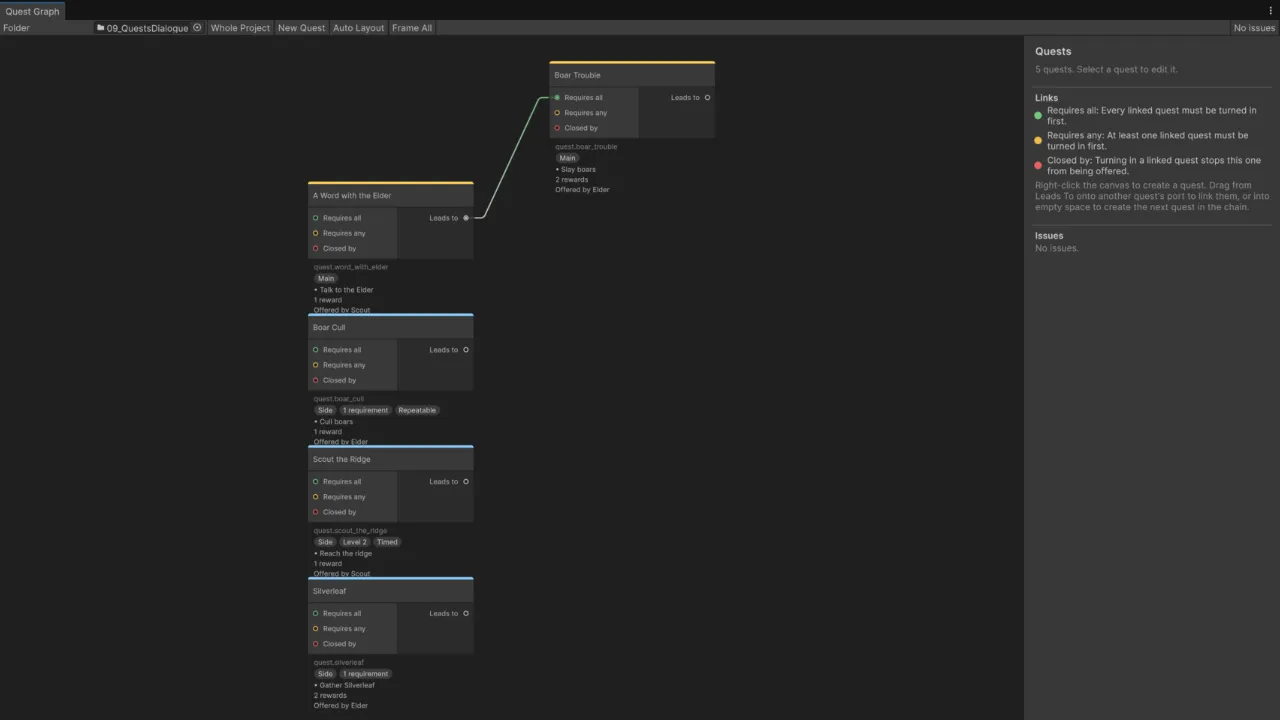
Double-click a quest asset, or click Open Quest Graph in its inspector, to see the quests in its folder as a graph. Vantage → Quest Graph shows every quest in the project; set Folder to narrow it down.
- Each quest is a node with its category colour, id, level, objectives, rewards, and who offers it: unit definitions that list it in Offered Quests, and dialogues with a Quest effect that accepts it.
- Links are the prerequisite lists. Drag from Leads to onto another quest’s Requires all (Required Completed Quests, green), Requires any (Required Any Of Quests, yellow) or Closed by (Excluded By Quests, red). Linking a quest to Requires all takes it out of Requires any, and the other way round. Drag a link away from its port to remove it.
- Drop a link into empty space to create the next quest, already linked, or right-click the canvas for New Quest. New quests go into the folder shown, or next to the quest you dragged from. Rename the id they get.
- Quests from other folders that link to the shown ones appear dimmed, so every link has both ends on the canvas.
- The side panel edits the selected quest. Objectives, Rewards and Requirements have an Add menu that creates the asset inside the quest asset, including your own subclasses; pick Empty Slot to drag in a shared asset.
- Delete moves the selected quests to the trash after asking, and removes them from other quests’ lists.
- Problems show as orange or red node borders and in the side panel: missing or shared ids, no objectives, empty slots, quests that list themselves, a required quest that also closes the quest, required quests that close each other, prerequisite loops, and a repeat cooldown on a quest that is not repeatable.
Quest positions are stored in the quest assets; Auto Layout arranges the shown quests by chain. VtQuestValidation.Validate(quests, allQuests) returns the same issues, for a build script or a test.
Requirements
Create → Vantage → Quests → Requirements and drag the asset into the quest’s Requirements list. Every entry must pass before the quest is offered. Nothing is consumed; a requirement only checks.
| Requirement | Passes when |
|---|---|
| Item | The holder carries at least the count of the item in its inventory. |
| Currency | The holder’s wallet holds at least the amount. |
| Stat | The holder’s resolved stat is at least the minimum. Use a custom stat for reputation or renown. |
| Unit Tag | The holder’s unit definition carries the tag. Check Invert to require its absence. |
| Faction | The holder’s faction is one of the listed ones. |
| Quest State | Another quest is in the given state on the holder’s log: available, active, complete, turned in or failed. |
| Dialogue Flag | A flag set by a dialogue is present, or absent with Must Be Absent. |
| Time Of Day | The scene clock is in one of the listed day phases and has reached the minimum day. Never passes without a clock. See World time. |
A holder without the component a requirement reads from, for example no wallet for a currency requirement, does not pass. Requirements are re-evaluated on every IsAvailable call, so a quest becomes available the moment the condition holds.
Custom conditions are one subclass:
[CreateAssetMenu(menuName = "MyGame/Quests/Requirements/Guild Rank")]
public sealed class GuildRankRequirement : VtQuestRequirement
{
    public int minimumRank;
    public override bool IsMet(VtUnit holder)
        => holder.GetComponent<GuildMember>()?.Rank >= minimumRank;
}
Repeatable quests
Check Repeatable and set Repeat Cooldown Seconds. After turn-in the quest is offered again once the cooldown has passed, with fresh progress. The turn-in count is kept, so a repeatable quest keeps unlocking its chain even while it is active again.
The cooldown counts in game time. For a daily or weekly reset, leave the cooldown long and call log.ResetRepeat(quest) from your own reset at midnight.
Failing
| Field | Meaning |
|---|---|
| Time Limit Seconds | Seconds to finish the objectives after accepting. The timer stops once the quest is complete. |
| Fail When Tagged Unit Dies | The quest fails when any unit with this tag dies while the quest is active. Tag the escortee or the caravan. |
Anything else is log.Fail(quest) from your own code. A failed quest stays in the log under Failed until the player accepts it again or abandons it.
Runtime
var log = player.GetComponent<VtUnitQuestLog>();
log.IsAvailable(quest);
log.Accept(quest);
log.Abandon(quest);
log.TryTurnIn(quest);
log.Fail(quest);
log.ResetRepeat(quest);
log.Active; log.Completed; log.TurnedIn; log.Failed;
log.GetProgress(quest, objective);
log.GetSecondsRemaining(quest);
log.GetRepeatCooldownRemaining(quest);
log.HasEverTurnedIn(quest);

log.OnQuestAccepted            += q => { };
log.OnObjectiveProgressChanged += (q, objective, current, required) => { };
log.OnQuestComplete            += q => { };
log.OnQuestTurnedIn            += q => { };
log.OnQuestFailed              += q => { };
Rewards skip silently when the recipient lacks the matching component, for example an XP reward on a unit without a level. Handle overflow in OnQuestTurnedIn if your inventory can be full.
Custom objectives and rewards
Subclass VtQuestObjective and override only the hooks you need. The log calls them for every active quest.
[CreateAssetMenu(menuName = "MyGame/Quests/Objectives/Escort")]
public sealed class EscortObjective : VtQuestObjective
{
    public VtQuestLocationMarker destination;

    public override int OnLocationTick(VtUnit holder, int currentProgress)
    {
        var escortee = FindEscortee(holder);
        if (escortee == null || destination == null) return currentProgress;
        var close = Vector3.Distance(escortee.position, destination.transform.position) < 2f;
        return close ? requiredCount : currentProgress;
    }
}[CreateAssetMenu(menuName = "MyGame/Quests/Rewards/Buff")]
public sealed class BuffReward : VtQuestReward
{
public VtBuffDefinition buff;
public override void Grant(VtUnit recipient)
=> recipient.GetComponent<VtUnitBuffs>()?.ApplyBuff(buff, 0f, recipient.Id);
}Talk targets without quests
An NPC with Use Quest Giver and an empty Offered Quests list is a plain talk target. Talk objectives complete when the player interacts with it.