06 · Leveling and Talents
Kills give experience, levels come from an XP curve, and every level brings talent and attribute points to spend in a talent tree.
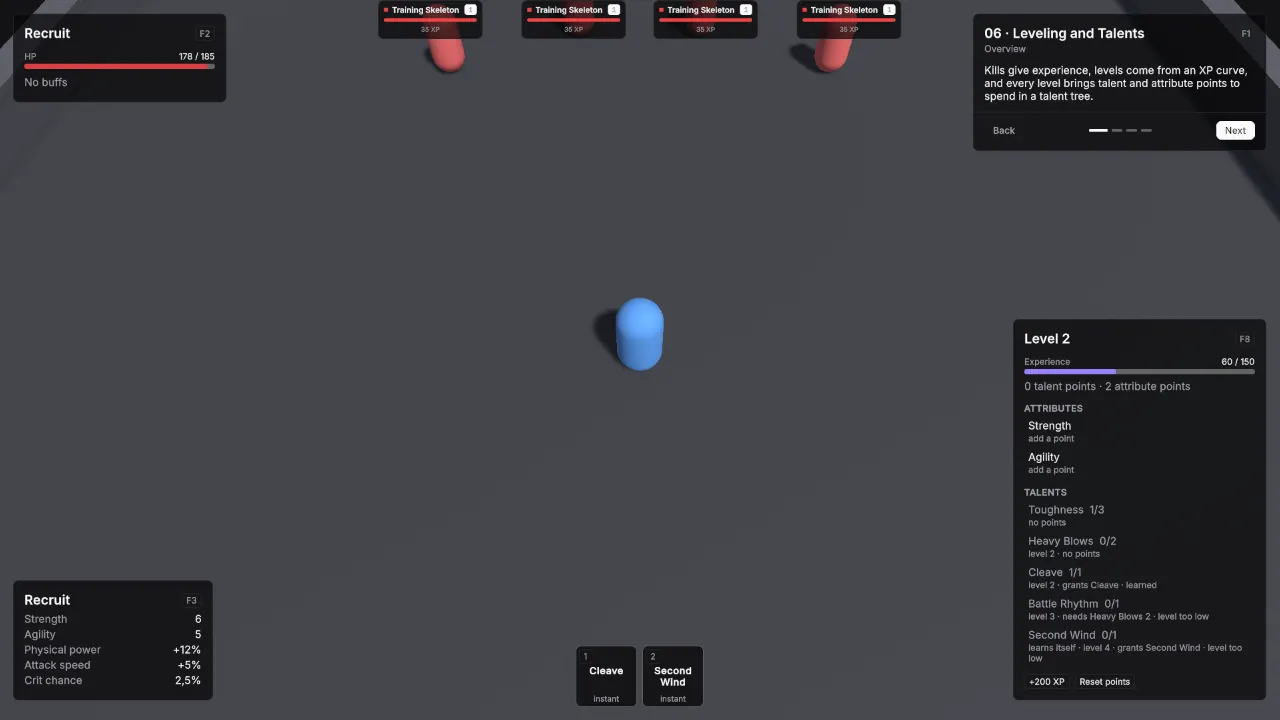
Scene Scenes/06_LevelingTalents. Assets Content/06_LevelingTalents and Content/Shared.
What it teaches
- A unit levels when its definition has an XP curve. Monsters give experience through XP Award.
- A talent tree is one asset that lists talent assets. Each talent names its level, prerequisites, ranks, cost and what it grants.
- Talents grant stat modifiers or abilities, and an auto-learn talent learns itself when its level is reached.
- Attribute points are placed by the player and feed the derived stats.
Assets
Unit definitions use the demo defaults unless listed: one HP pool without regeneration, Physical damage in Channel Melee, Attack Range 2, Attack Interval 1, Move Speed 5, and the shared BasicAttack.
RecruitCurve, an XP Curve: Id xp.recruit, Max Level 10, XP To Next Level 100, 150, 200, 260, 330, 410, 500, 600, 710.
| Ability | Settings |
|---|---|
| Cleave | Id ability.recruit_cleave, Icon Id swords, Targeting Mode Single Target, Range 3, Cooldown 4, no cost. Effect CleaveDamage, a Damage effect: 14 to 18 Physical, Channel Melee, Splash Radius 3. |
| Second Wind | Id ability.second_wind, Icon Id wind, Targeting Mode Self, Cooldown 20, Triggers GCD off. Effect SecondWindHeal, a Heal effect of 60. |
Talents, each with Point Cost 1:
| Talent | Id | Required Level | Max Rank | Grants |
|---|---|---|---|---|
| Toughness | talent.toughness |
1 | 3 | Modifiers Per Rank: MaxHp +25. |
| Heavy Blows | talent.heavy_blows |
2 | 2 | Modifiers Per Rank: Physical Power +10%. |
| Cleave | talent.cleave |
2 | 1 | Abilities: Cleave. |
| Battle Rhythm | talent.battle_rhythm |
3 | 1 | Prerequisites: Heavy Blows at rank 2. Modifiers Per Rank: Attack Speed +20%. |
| Second Wind | talent.second_wind |
4 | 1 | Auto Learn on, so it costs nothing. Abilities: Second Wind. |
WarriorTree, a Talent Tree: Id tree.warrior, Talents in the order above, Starting Talent Points 1, Talent Points Per Level 1, Starting Attribute Points 0, Attribute Points Per Level 2, Spendable Attributes Strength and Agility.
| Unit Definition | Settings |
|---|---|
| Recruit | Id unit.recruit, Faction Player, HP 160 with Regen Mode Out Of Combat Only at 4 per second, Min / Max Damage 8 / 12, XP Curve RecruitCurve, Starting Level 1, Talent Tree WarriorTree, Base Attributes Strength 5 and Agility 5, Attribute Growth Per Level Strength +1. |
| Training Skeleton | Id unit.training_skeleton, Faction Enemy, HP 60, Min / Max Damage 2 / 3, Attack Interval 1.5, Move Speed 3.5, Use Hostile AI on, Aggro Range 4, XP Award 35. |
| Veteran | Id unit.veteran, Faction Enemy, HP 260, Min / Max Damage 6 / 9, Move Speed 4, Use Hostile AI on, Aggro Range 4, XP Award 150. |
MaxHp is the pool stat in the package’s Runtime/CoreStats/Pools. Strength and Agility are the shared attributes in Content/Shared, and the shared AttributeFormula turns Strength into Physical Power and Agility into Crit Chance and Attack Speed.
Scene
Ground 36 × 36.
| Object | Setup |
|---|---|
| Player | Player prefab at (0, 0, -6). Definition Recruit. VtAttributeDerivedStatsBinding with Formula AttributeFormula. VtAbilityHotkeys slots: key 1 Cleave, key 2 Second Wind. VtDemoReviveAfterDeath 4 seconds, Return To Start on. |
| Training Skeletons | Four Unit prefabs with Training Skeleton at (-6, 0, 5), (-2, 0, 7), (2, 0, 7) and (6, 0, 5). VtNameplateInfo with Subtitle “35 XP”. VtDemoReviveAfterDeath 4 seconds, Return To Start on. |
| Veteran | Unit prefab with Veteran at (0, 0, 13). VtNameplateInfo with Subtitle “150 XP”. VtDemoReviveAfterDeath 8 seconds, Return To Start on. |
| Demo UI | Lesson card. Two VtUnitFrame with Unit set to the player and Region Top Left, one with Source Unit and one with Source Target Of Unit. VtBuffBar with Unit set to the player and Region Top Left. VtResourceBar with Unit set to the player, Bar Source Cast and Region Top Left. VtResourceBar with Unit set to the player, Bar Source Experience and Region Top Left. VtStatList titled Recruit with Region Bottom Left and rows Strength, Agility, Physical power, Attack speed and Crit chance. VtTalentWindow with Unit set to the player and VtDemoWindowKey with Window the talent window, Panel Name talents and Toggle Key F8. VtActionBar with the player’s VtAbilityHotkeys, Region Bottom Center and Slot Size Large. |
Build it yourself
- Build the Unit and Player prefabs as in Build the prefabs.
- Create → Vantage → Leveling → XP Curve, name it RecruitCurve, and fill in the values above.
- Create the two abilities and their effects with Create → Vantage → Abilities and the values above.
- Create → Vantage → Progression → Talent five times with the values above, then Create → Vantage → Progression → Talent Tree for WarriorTree.
- Create the three unit definitions with Create → Vantage → Units → Unit Definition.
- Build the scene as in Build the shared layout with a 36 × 36 Level.
- Place the player, add a VtAttributeDerivedStatsBinding with the shared AttributeFormula, and put Cleave and Second Wind in its hotkey slots 1 and 2.
- Place the four skeletons and the Veteran.
Try
- Kill skeletons for experience. The Veteran is worth far more.
- Press F8 and spend talent points in the talent window. Toughness has three ranks; Battle Rhythm needs Heavy Blows at rank 2.
- Learn Cleave and press 1. Second Wind learns itself at level 4; press 2.
- Place attribute points in Strength or Agility and watch the stat sheet.
- Reset points gives every point back.
In your own game
- Item requirements, recipes and quests read the same level. See Leveling and Progression.